Autonomous Document Workflows with AI Agents: From Setup to Validation and Export
Document automation is moving beyond simple data extraction.
For years, many automation projects focused on reading documents faster: OCR, classification, field extraction, table extraction, and export to another system. These capabilities are still important, but they are no longer enough for teams that need to manage complete document-driven processes.
Business teams do not only need to know what is inside a document. They need to define which document types exist, what data should be extracted, which validation rules apply, who should review exceptions, what reports are needed, and how validated data should be exported.
This is where autonomous document workflows with AI agents become important.
Autonomous document workflows use AI agents to help configure and run document processes from setup to validation and export. The goal is not uncontrolled automation. The goal is controlled, rule-based automation where AI agents reduce repetitive implementation and operational work while humans stay involved for exceptions, approvals, and business judgment.
SenseTask uses AI agents to help teams define document types, create extraction schemas, train or configure document models, validate information at document and collection level, detect rule exceptions, route issues for review, generate reports, track actions, and export validated data to ERP, TMS, DMS, CRM, or internal systems.
For teams that manage groups of related files, SenseTask also supports document collection processing to validate documents together as part of one connected workflow.
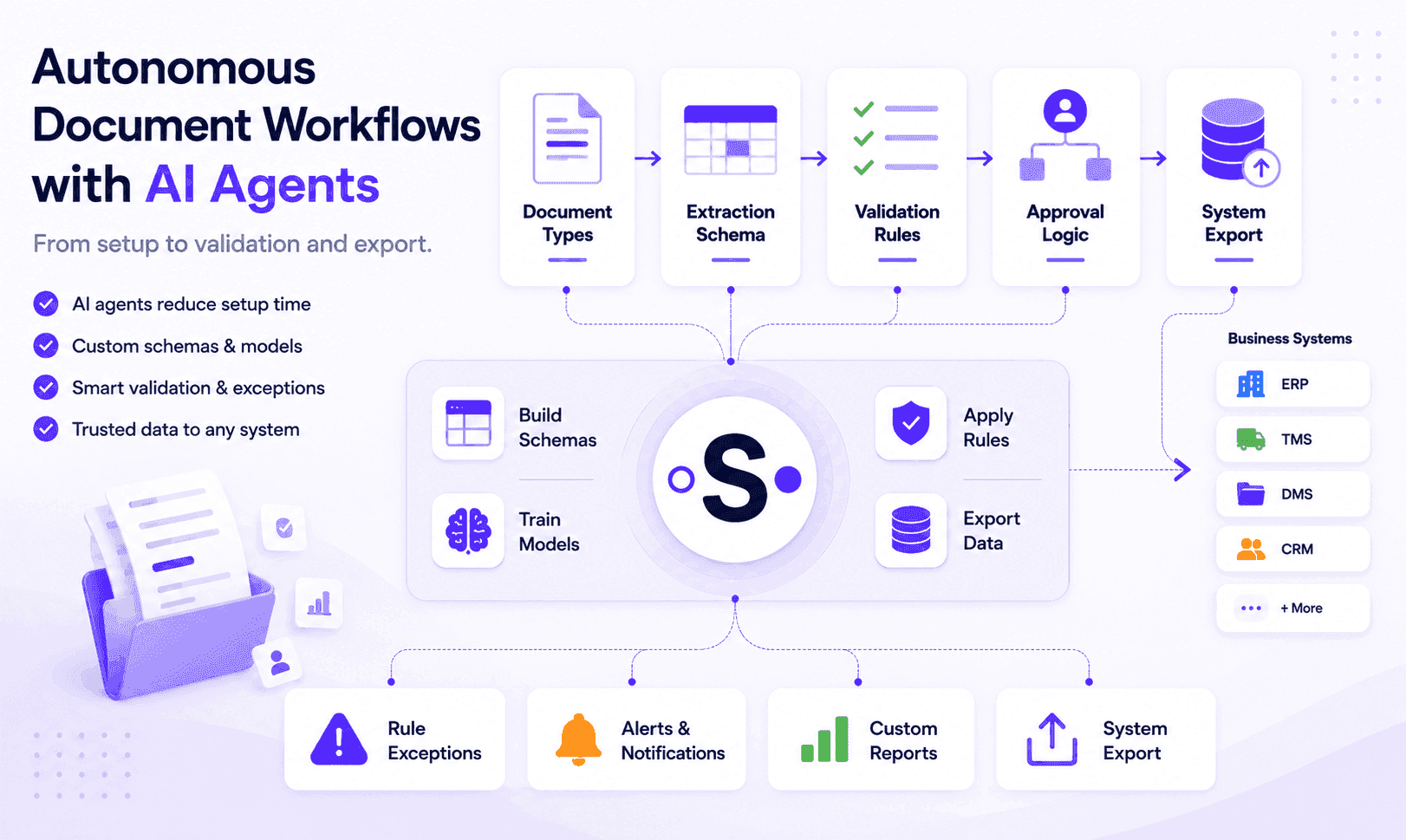
Quick Answer: What Are Autonomous Document Workflows?
Autonomous document workflows are AI-assisted workflows that help teams configure, process, validate, review, report, and export business documents.
They go beyond Intelligent Document Processing because they do not stop after extracting data. They help teams set up document types, define extraction schemas, apply business rules, validate documents, manage exceptions, support approvals, generate reports, keep an audit trail, and export reliable data to business systems.
In practice, document extraction answers:
What information is inside this document?
Autonomous document workflows answer:
Can this document, document collection, dossier, or business file move forward safely, and what should happen next?
That next step may be approval, payment, shipment closure, project continuation, compliance review, system export, reporting, or final submission.
Traditional IDP vs Autonomous Document Workflows
Traditional Intelligent Document Processing focuses mainly on classifying documents and extracting structured data. Autonomous document workflows go further by supporting what happens before and after extraction: setup, schemas, validation, exceptions, approvals, reports, audit trail, and system export.
| Area | Traditional IDP | Autonomous Document Workflows with AI Agents |
|---|---|---|
| Main goal | Extract data from documents | Move documents from setup to validated business outcomes |
| Setup | Often requires manual configuration by technical teams | AI agents can support document type setup, extraction schema creation, and model configuration |
| Core capabilities | OCR, classification, field extraction, table extraction | Setup, classification, extraction, validation, exceptions, approvals, reports, export |
| Main question answered | What information is inside this document? | Is this document or document collection ready to move forward? |
| Scope | Usually one document at a time | One document, document collection, dossier, case, project, or shipment file |
| Validation | Often limited to field confidence or basic rules | Document-level and collection-level validation based on business rules |
| Exceptions | Usually sent to manual review when confidence is low | Routed based on rule exceptions, missing documents, approvals, and business context |
| Human role | Correct extracted fields | Define rules, review exceptions, approve decisions, and control high-risk steps |
| Reporting | Processing and extraction metrics | Operational reports, exception reports, approval status, readiness, and audit history |
| Export | Extracted data export | Validated data export with approval status, exception status, document links, and audit trail |
| Best fit | Reducing manual data entry | Automating document-driven workflows with control and traceability |
Both approaches are useful, but they solve different problems. IDP helps teams digitize and extract document data. Autonomous document workflows help teams configure, validate, control, and complete the business process around that data.
Why Document Automation Is Moving Beyond Extraction
Traditional document automation often starts with a simple objective: reduce manual data entry.
A system reads an invoice, contract, certificate, CMR, mortgage document, insurance claim, or supplier file. It extracts fields and sends the data somewhere.
That helps, but many business workflows still remain manual before and after extraction.
Before processing begins, teams may still need to define:
- Which document types are expected
- Which fields should be extracted
- Which tables matter
- Which validation rules apply
- Which documents are required in a collection
- Which exceptions need review
- Which approval paths should be followed
- Which reports are needed
- Which fields should be exported
- Which business systems should receive the data
After extraction, teams still need to check:
- Is the document complete?
- Are required fields present?
- Is the extracted data correct?
- Does the document match related documents?
- Is the full document collection complete?
- Are any documents missing or expired?
- Did a business rule fail?
- Who needs to review the exception?
- What should be approved?
- What should be exported?
- What history should remain available for audit?
This is why document automation is shifting from extraction-only systems toward workflows that support setup, validation, rules, exceptions, approvals, reports, and export.
The business value is not only reading documents faster. The business value is moving document-driven work forward with more control, less manual configuration, less repetitive checking, and better traceability.
What Makes a Document Workflow Autonomous?
A document workflow becomes autonomous when the system can help coordinate multiple steps in the document process without requiring users to manually manage every action.
This may include:
- Defining document types
- Creating extraction schemas
- Training or configuring document models
- Classifying incoming documents
- Extracting relevant fields and tables
- Checking document completeness
- Applying validation rules
- Detecting missing or inconsistent information
- Comparing documents with related files or system records
- Triggering rule exceptions
- Routing issues to the right person
- Supporting approvals
- Generating reports
- Preparing data for export
- Keeping an audit trail
However, autonomous does not mean fully automatic or unsupervised.
In enterprise document workflows, autonomy should be controlled by business rules, permissions, review steps, approval flows, and audit history. AI agents can reduce repetitive work, but humans should remain involved when judgment, risk, or accountability matters.
A better way to think about autonomous document workflows is:
AI agents automate the repetitive document work. Humans control the exceptions, rules, and decisions that matter.
How AI Agents Reduce Implementation Work
One of the biggest challenges in document automation is implementation.
Many document automation projects require teams to define document types, build extraction schemas, configure models, create rules, test outputs, map fields to business systems, and refine the process over time.
AI agents can help reduce this implementation burden.
Instead of starting every workflow from a blank configuration, AI agents can support tasks such as:
- Suggesting document types based on uploaded samples
- Proposing extraction fields for each document type
- Creating initial extraction schemas
- Identifying tables and line-item structures
- Helping configure validation rules
- Suggesting required documents for a collection or dossier
- Detecting missing fields or inconsistent outputs during testing
- Supporting model training or model refinement
- Mapping extracted fields to ERP, TMS, DMS, CRM, or internal systems
- Recommending reports based on workflow data
- Improving rules based on review history and exceptions
This does not eliminate implementation work completely. Business teams still need to confirm the schema, rules, approval logic, and export mapping. But AI agents can make the process faster, more iterative, and easier to adapt when document types or workflows change.
For document-heavy teams, this matters because workflows are rarely static. New document formats appear, customers have different requirements, suppliers use different templates, and business rules evolve.
Autonomous document workflows should help teams adapt faster.
Setup, Validation, and Export: Where AI Agents Help
AI agents are most useful when they reduce repetitive work across the full document workflow, not only during extraction.
| Workflow stage | How AI agents help |
|---|---|
| Setup | Suggest document types, fields, schemas, and required documents |
| Model configuration | Support training, refinement, and testing of document models |
| Extraction | Capture fields, tables, references, and document metadata |
| Validation | Apply rules, check completeness, and compare related documents |
| Exceptions | Detect missing data, failed rules, and documents that need review |
| Approvals | Route documents based on thresholds, roles, and business conditions |
| Reporting | Generate operational, exception, readiness, and audit reports |
| Export | Prepare clean, validated data for business systems |
This is where autonomous document workflows become different from extraction-only automation: they support the full path from setup to validation and export.
AI Agent Roles in Document Workflow Automation
AI agents can support different parts of the document workflow. Each agent can focus on a specific role, while the full workflow remains governed by rules, review steps, permissions, and audit history.
| Agent | Role in the workflow |
|---|---|
| Setup Agent | Helps define document types, extraction schemas, validation rules, and workflow settings |
| Classification Agent | Identifies document type and sends it to the right workflow |
| Extraction Agent | Captures structured fields and tables from documents |
| Validation Agent | Checks required fields, business rules, dates, totals, and related documents |
| Exception Routing Agent | Sends issues to the right user, team, or approval path |
| Approval Agent | Supports approval flows based on rules, thresholds, exceptions, and review requirements |
| Reporting Agent | Creates process, exception, readiness, and audit reports |
| Export Agent | Prepares validated data for ERP, TMS, DMS, CRM, or internal systems |
Together, these agents help move documents from workflow setup to business outcome, rather than stopping at extraction.
Setup Agent
A setup agent helps configure the workflow before documents are processed at scale.
Examples include:
- Identify document types from sample files
- Suggest fields to extract
- Create a draft extraction schema
- Detect tables and repeating line items
- Suggest required fields
- Suggest required documents for a collection
- Help define validation rules
- Help define exception categories
- Support export field mapping
- Support workflow testing and refinement
This is important because implementation is often one of the slowest parts of document automation.
If AI agents can help create the first version of a workflow configuration, teams can move faster from discovery to production.
Classification Agent
A classification agent identifies what type of document has been received.
Examples include:
- Invoice
- Purchase order
- Contract
- Certificate
- CMR
- Waybill
- Bill of lading
- Mortgage document
- Bank statement
- Claim form
- Policy document
- Permit
- Drawing
- Supplier document
- Compliance record
Correct classification matters because each document type may have different extraction fields, validation rules, approval paths, and export formats.
Extraction Agent
An extraction agent captures structured data from documents.
Examples include:
- Supplier name
- Invoice number
- Total amount
- Tax value
- Currency
- Due date
- Shipment reference
- Contract value
- Permit number
- Expiry date
- Applicant name
- Policy number
- Claim amount
- Project name
- Approval status
For more complex workflows, the extraction agent may also need to capture tables, line items, multiple entities, references, dates, quantities, tax values, or document-specific metadata.
Extraction turns documents into usable data. But extraction alone does not confirm that the data is valid or ready for action.
Validation Agent
A validation agent checks whether extracted data meets document, workflow, and business rules.
Examples include:
- Required fields are present
- Dates are valid
- Totals and taxes are consistent
- Supplier data matches master data
- Shipment references match operational data
- Certificates are still valid
- Required signatures are present
- Document versions are correct
- Related documents match
- A full document collection is complete
This is one of the most important layers in an autonomous document workflow because it connects document understanding to business readiness.
For teams handling groups of related documents, this validation layer often extends into multi-document validation, where related files are checked together instead of separately.
Exception Routing Agent
An exception routing agent helps decide what happens when something fails validation.
Examples include:
- Missing required document
- Missing required field
- Amount above approval threshold
- Expired certificate
- Shipment reference not found
- Supplier mismatch
- Missing proof of delivery
- Inconsistent applicant data
- Missing claim evidence
- Unresolved comment
Instead of sending every document through the same manual review process, the workflow can route exceptions to the right user, team, or role.
Approval Agent
An approval agent supports approval flows based on rules, extracted data, validation results, and exception types.
Examples include:
- Route high-value invoices for manager approval
- Require compliance review for expired documents
- Send logistics exceptions to operations
- Send contract exceptions to legal
- Trigger approval when a document collection is complete
- Block export until required approvals are completed
The approval agent does not remove accountability. It helps make sure the right approval path is followed.
Reporting Agent
A reporting agent helps generate visibility from documents, validation results, comments, approvals, and workflow history.
Reports may include:
- Missing documents
- Rule exceptions
- Approval status
- Expired documents
- Open comments
- Project readiness
- Shipment file status
- Supplier status
- Validation results
- Export history
- Audit history
This is especially important for document collections that remain active over time, such as construction projects, supplier dossiers, compliance files, legal cases, mortgage applications, or insurance claims.
Export Agent
An export agent prepares validated data for downstream systems.
Export may include:
- ERP data
- TMS data
- DMS metadata
- CRM records
- Accounting entries
- Loan application data
- Insurance claim data
- Procurement records
- Document links
- Validation results
- Approval status
- Audit information
The goal is not simply to export extracted data. The goal is to export data that has passed the required validation, review, and approval steps.
Controlled Autonomy: Why Human Oversight Still Matters
Autonomous document workflows should not be confused with uncontrolled automation.
In real business environments, documents often carry financial, legal, operational, or compliance risk. A system should not blindly approve every document just because data was extracted successfully.
Human oversight is still important when:
- An exception is high-risk
- A value exceeds an approval threshold
- Data is ambiguous
- A required document is missing
- Documents conflict with each other
- A customer, supplier, shipment, project, claim, or applicant needs manual review
- A decision has legal, financial, or compliance consequences
The best autonomous document workflows combine automation with control.
AI agents can handle repetitive work such as setup support, classification, extraction, validation checks, missing document detection, routing, reporting, and export preparation. Humans can focus on judgment, exception handling, approvals, and final decisions.
This creates a more practical model for enterprise automation:
Automation where possible. Human review where necessary. Full traceability everywhere.
Document-Level Validation and Collection-Level Validation
Autonomous document workflows are strongest when they validate documents at more than one level.
Document-Level Validation
Document-level validation checks whether one document is complete, correct, and usable.
Examples include:
- Does the invoice include supplier name, invoice number, total amount, tax value, currency, and due date?
- Does the certificate include supplier name, certificate number, issue date, and expiry date?
- Does the CMR include required transport references, carrier details, dates, and signatures?
- Does the claim form include policy number, claimant details, incident date, and required fields?
- Does the mortgage document include applicant details, property reference, income information, or signature?
Document-level validation helps ensure each file is usable on its own.
Collection-Level Validation
Collection-level validation checks whether a group of related documents is complete, consistent, and ready for the next step.
Examples include:
- A shipment file with carrier invoice, CMR, waybill, customs documents, packing list, and proof of delivery
- A mortgage application with IDs, income documents, bank statements, property documents, valuation reports, and signed forms
- An insurance claim with claim form, policy documents, photos, invoices, reports, and supporting evidence
- A supplier dossier with tax certificates, contracts, insurance documents, compliance forms, and company records
- A construction project file with permits, approvals, drawings, certificates, contracts, reports, and comments
- A legal case file with contracts, annexes, IDs, certificates, evidence, approvals, and correspondence
Collection-level validation answers a more complete business question:
Is the full file ready to move forward?
This is where autonomous document workflows go beyond single-document processing. It is also why document collection processing is useful for teams that need to validate related documents as one connected file, dossier, or project.
Rule Exceptions, Alerts, Approvals, and Audit Trails
A document workflow is only useful if it can handle the cases where something goes wrong.
Autonomous document workflows should support rule exceptions, alerts, approvals, and audit trails.
Examples of rule exceptions include:
- Required document missing
- Required field missing
- Expired certificate, permit, authorization, or compliance document
- Amount above approval threshold
- Invoice mismatch
- Shipment reference not found
- Supplier name mismatch
- Applicant details inconsistent across mortgage documents
- Policy number mismatch in an insurance claim
- Missing signature
- Missing proof of delivery
- Unresolved comment blocking approval
When these exceptions appear, the system should not simply fail silently. It should make the issue visible and route it to the right person or team.
A strong workflow should also keep track of:
- Who reviewed the document
- Who approved or rejected it
- What changed
- Which exception was resolved
- When a comment was added
- When data was exported
- Which version was used
- Which rules were applied
This audit trail is critical for internal review, compliance, customer reporting, supplier disputes, financial controls, and operational visibility.
Reports and Operational Visibility
Autonomous document workflows should not only process documents. They should also help teams understand what is happening across the process.
Useful reports may include:
- Documents processed
- Documents waiting for review
- Rule exceptions
- Missing documents
- Expired documents
- Approval times
- Open comments
- Export status
- Project readiness
- Shipment file readiness
- Supplier status
- Claim readiness
- Mortgage application completeness
- Audit history
For transactional workflows, reports often focus on processing performance, exception rates, approval times, validation errors, and export status.
For project, case, or dossier workflows, reports may be periodic and operational. Teams may need weekly or monthly reports showing missing documents, expiring permits, unresolved comments, open issues, validation status, and readiness for the next phase.
This is important because many document workflows remain active over time. They are not always completed immediately after extraction.
Exporting Validated Data to Business Systems
The final step in many document workflows is export.
But there is a major difference between exporting extracted data and exporting validated data.
Extracted data may still be incomplete, incorrect, unapproved, duplicated, or missing context. Validated data has passed the required checks before it reaches the next system.
Autonomous document workflows can export validated data to systems such as:
- ERP
- TMS
- DMS
- CRM
- Accounting platforms
- Procurement systems
- Loan origination systems
- Claims platforms
- Logistics platforms
- Internal business systems
- Custom operational platforms
Depending on each client’s setup, this may include systems such as SAP, Microsoft Dynamics 365 Business Central, Odoo, CargoWise, Oracle Transportation Management, SAP Transportation Management, Blue Yonder, Descartes, Salesforce, SharePoint, or internal applications.
Exported data may include:
- Extracted fields
- Validation results
- Approval status
- Exception status
- Document metadata
- Document links
- Audit information
- Report outputs
- System-ready structured data
The goal is to send reliable information downstream, not just raw extracted fields.
Examples of Autonomous Document Workflows
Autonomous document workflows can support many document-heavy business processes.
Logistics and Transport
Logistics teams need to validate shipment files, carrier invoices, CMRs, waybills, bills of lading, customs documents, packing lists, and proof of delivery.
AI agents can help define transport document types, extract shipment references, match invoices to shipment data, identify missing documents, route exceptions, generate reports, and export validated data to CargoWise, TMS, ERP, or internal systems.
For a deeper logistics example, see how AI agents can help with shipment document validation for freight and logistics.
Finance and Invoice Processing
Finance teams need to process invoices, validate extracted fields, check ERP records, apply approval rules, handle exceptions, and export reliable data to accounting or ERP systems.
AI agents can help define invoice schemas, identify supplier data, check totals and taxes, apply approval thresholds, detect missing supporting documents, route exceptions, and keep an audit trail.
Construction and Architecture
Construction and architecture teams manage permits, approvals, drawings, certificates, contracts, reports, and documents that expire over time.
AI agents can help define project document types, monitor document completeness, track expiry dates, detect unresolved comments, generate project readiness reports, and support periodic validation.
For project-based teams, document workflows can also support AI project document management for construction and architecture.
Mortgage Applications and Lending
Banking and lending teams need to validate application files with IDs, income documents, bank statements, property documents, valuation reports, and signed forms.
AI agents can help define required document packages, check whether required documents are present, compare applicant details across documents, route missing information, and prepare validated data for review or export.
Insurance Claims
Insurance teams need to validate claim forms, policy documents, photos, invoices, reports, and supporting evidence.
AI agents can help define claim document types, check policy numbers, claimant details, claim amounts, missing evidence, approval readiness, and audit history.
Legal and Compliance
Legal and compliance teams manage contracts, annexes, certificates, policies, evidence, approvals, and regulatory records.
AI agents can help define required document sets, validate signatures, track expiry dates, detect missing approvals, route exceptions, and generate audit-ready reports.
Procurement and Supplier Management
Procurement teams need to manage supplier files with certificates, tax records, insurance documents, contracts, onboarding forms, and compliance documents.
AI agents can help define supplier dossier requirements, validate supplier files, monitor certificate expiry, route renewal tasks, support onboarding approvals, and generate supplier status reports.
What to Look for in an Autonomous Document Workflow Platform
When evaluating an autonomous document workflow platform, companies should look beyond OCR and extraction accuracy.
Important capabilities include:
- AI-assisted workflow setup
- Document type configuration
- Custom extraction schemas
- Support for training or refining document models
- AI document classification
- Structured data extraction
- Table extraction
- Document-level validation
- Collection-level validation
- Configurable business rules
- Rule exceptions and warnings
- Alerts and notifications
- Human-in-the-loop review
- Approval workflows
- Document-level comments
- Issue resolution
- Custom reports
- Audit trail and action history
- Export to ERP, TMS, DMS, CRM, or internal systems
- Support for document collections, dossiers, projects, cases, and long-running workflows
- Security, access control, and traceability
The best platform is not only the one that reads documents accurately. It is the one that helps teams move from setup to reliable business outcomes.
Why Autonomous Does Not Mean Fully Automated
The word autonomous can sound like the system makes every decision by itself. In document workflows, that is not the right model.
Autonomous document workflows should be governed by business rules, permissions, review steps, and human oversight.
The system can automate repetitive checks, detect exceptions, prepare reports, and export validated data. It can also support configuration work, schema creation, model setup, and workflow refinement. But humans should remain involved for sensitive decisions, unusual exceptions, high-value approvals, legal questions, compliance risk, or customer-specific judgment.
This is especially important in enterprise workflows where documents affect payments, shipments, contracts, claims, loans, audits, compliance, and project progress.
A practical autonomous document workflow is not a black box. It should be explainable, configurable, reviewable, and traceable.
Conclusion
Autonomous document workflows with AI agents represent the next stage of document automation.
They go beyond classification and extraction. They help teams configure workflows, define extraction schemas, validate documents, manage rule exceptions, route approvals, generate reports, keep audit trails, and export reliable data to business systems.
This matters because business documents rarely exist in isolation. They belong to workflows, collections, dossiers, cases, projects, shipments, applications, claims, and supplier files.
SenseTask uses AI agents to help teams move from setup to validation and export. The platform supports document type configuration, custom extraction schemas, structured data extraction, document-level validation, collection-level validation, rule exceptions, approvals, alerts, reports, audit trails, and integration with business systems.
The result is not only faster document processing. It is a more controlled, traceable, and reliable way to manage document-driven work from intake to business outcome.
Ready to get started?
Build autonomous document workflows with SenseTask.