How AI Agents Help Logistics Teams Validate Shipment Files
For freight forwarders, trucking companies, air cargo operators, ocean freight teams, rail freight teams, and logistics providers, a shipment file is rarely a single document.
A single shipment may include carrier invoices, CMR documents, waybills, bills of lading, packing lists, customs documents, delivery notes, proof of delivery, customer references, shipment IDs, and internal shipment data. Before a shipment can be closed, invoiced, approved, posted, or reported, these documents and references often need to be checked together.
Traditional document processing usually focuses on extracting data from one document at a time. That helps reduce manual data entry, but it does not solve the full logistics problem. Logistics teams need to know whether the shipment file is complete, whether the documents match, whether required shipping documents are missing, whether shipment IDs have been detected correctly, and whether invoice lines can be matched or distributed across the right shipments.
SenseTask uses AI agents to help logistics teams classify shipment documents, extract structured data, detect shipment references, validate shipment files, identify rule exceptions, route issues for review, generate reports, and export validated data to logistics, ERP, TMS, or internal systems.
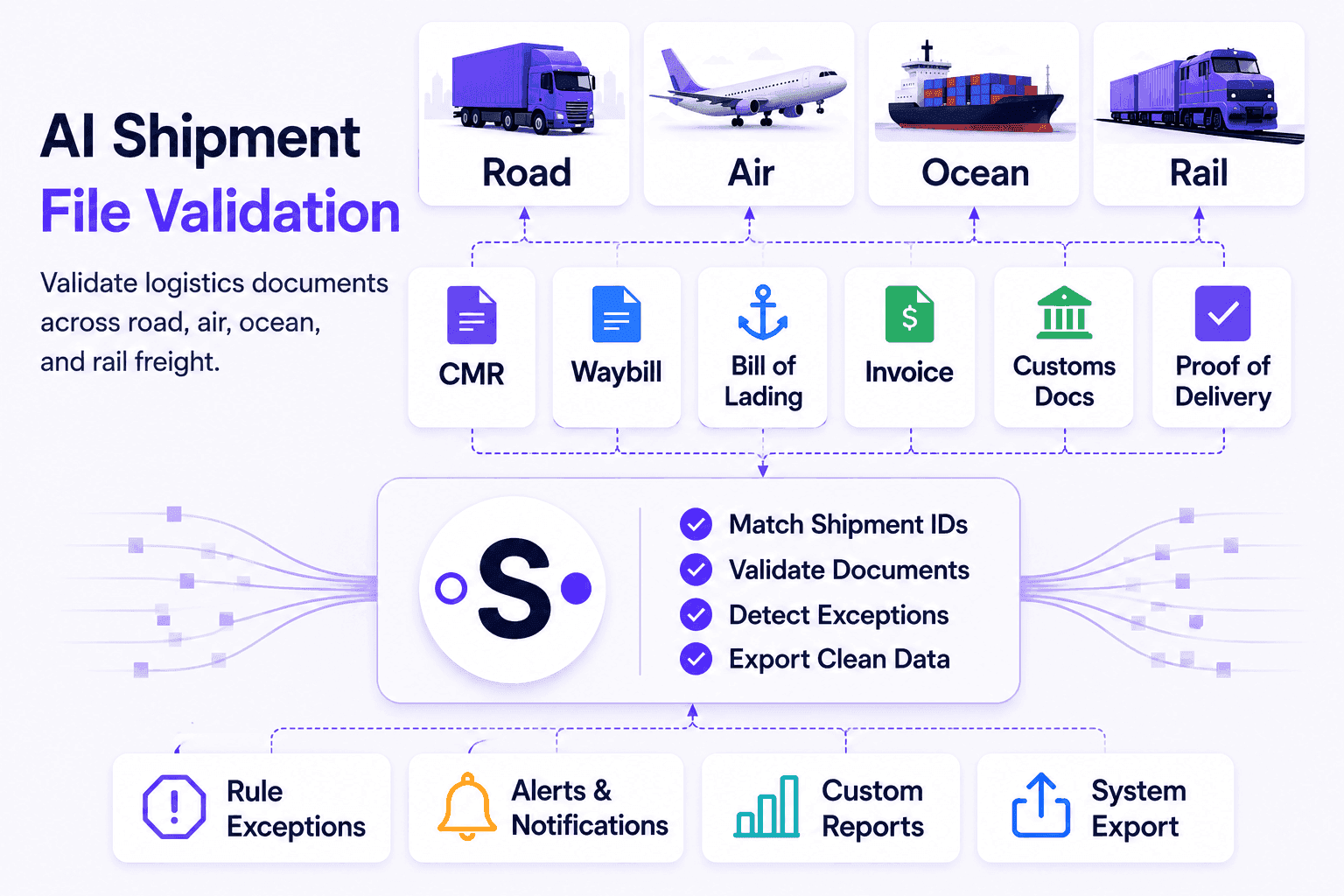
Why Shipment Files Are Multi-Document Workflows
In logistics, the business process does not depend on one isolated document. It depends on the full shipment file.
A carrier invoice may look correct on its own, but it may still need to be checked against shipment data, agreed rates, weight, route, delivery confirmation, or supporting transport documents. A CMR may confirm road transport, but the shipment file may still be incomplete if a customs document, packing list, waybill, or proof of delivery is missing.
This is why logistics document automation needs to go beyond extraction. It needs to validate the full document context.
Common shipment file issues include:
- Missing CMR, waybill, bill of lading, packing list, or proof of delivery
- Carrier invoices that do not match shipment references
- Multiple shipment IDs detected on the same invoice
- Invoice lines that need to be distributed across multiple shipments
- Different weights, volumes, routes, dates, or charges across documents
- Missing customs documents or supporting files
- Incorrect customer, consignee, carrier, or shipment references
- Manual checks before invoice approval, posting, or shipment closure
- Unclear audit trail for who reviewed, approved, or corrected a document
When these checks are handled manually, teams spend too much time switching between emails, PDFs, spreadsheets, shared folders, CargoWise, ERP, TMS, and internal systems.
AI agents can help reduce this manual work by organizing shipment documents into connected files, extracting the relevant data, detecting shipment references, and validating the information before approval, export, posting, or reporting.
Common Documents in a Logistics Shipment File
A shipment file can include different documents depending on the transport mode, route, customer, carrier, and internal process.
For road freight and trucking, shipment files may include:
- CMR documents
- Delivery notes
- Carrier invoices
- Proof of delivery
- Packing lists
- Customer references
- Driver or transport confirmations
- Shipment or order data
For air freight, shipment files may include:
- Air waybills
- Carrier invoices
- Commercial invoices
- Packing lists
- Customs documents
- Delivery orders
- Security or compliance documents
- Proof of delivery
For ocean freight, shipment files may include:
- Bills of lading
- Arrival notices
- Delivery orders
- Commercial invoices
- Packing lists
- Customs documents
- Carrier invoices
- Port or terminal documents
For rail freight, shipment files may include:
- Rail waybills
- Carrier invoices
- Intermodal documents
- Delivery notes
- Customs documents
- Packing lists
- Wagon, container, or consignment references
- Proof of delivery
For freight forwarding and multi-modal logistics, a single shipment may include documents from multiple carriers, modes, countries, and systems.
SenseTask helps teams group these documents into shipment files, classify document types, extract key fields, and validate whether the shipment documentation is complete and ready for the next step.
Validating Carrier Invoices Against Shipment Data
Carrier invoice validation is one of the most important logistics use cases because the invoice often needs to be checked against operational data before approval or posting.
A carrier invoice may need to be validated against:
- Shipment ID or job reference
- Carrier name and supplier data
- Multiple shipment references on one invoice
- Agreed rates or tariffs
- Weight, volume, and chargeable weight
- Route, service type, and delivery confirmation
- Pickup and delivery locations
- Shipment dates
- Customs or transport documents
- Invoice line distribution across shipments
- Split amounts, taxes, and posting lines
- Internal shipment or order data
In many logistics teams, this process is still manual. Someone opens the carrier invoice, checks the shipment reference, compares the amount with expected charges, verifies supporting documents, decides whether lines belong to one shipment or several shipments, and then determines whether the invoice can be approved or needs review.
SenseTask can help automate this process by extracting invoice data, detecting shipment references, checking data against shipment records and supporting documents, distributing invoice lines across shipments when needed, and flagging rule exceptions when something does not match.
For example:
- The carrier invoice references the correct shipment, but the proof of delivery is missing.
- The invoice amount does not match the agreed rate.
- The weight, volume, or route differs from the shipment data.
- The carrier name does not match the expected supplier.
- The invoice includes multiple shipment references on the same line or document.
- A line needs to be allocated across multiple shipments.
- The shipment file is missing a required CMR, waybill, customs document, or delivery document.
Instead of approving invoices based only on extracted fields, logistics teams can validate the full shipment context before payment, export, posting, or customer reporting.
Matching Shipment References and Distributing Invoice Lines
In freight and logistics workflows, a carrier invoice does not always map cleanly to one shipment.
A single invoice may include multiple shipment references. A document-level reference may apply to several shipments. One invoice line may need to be split between multiple shipments based on operational data such as weight, volume, or chargeable weight.
This is where logistics invoice validation becomes more complex than simple data extraction.
SenseTask can help identify shipment references at document level and line level, match detected references to shipment data, and support line distribution across multiple shipments when required.
For example, a logistics invoice may need to be validated by:
- Detecting shipment IDs or shipment references from the invoice
- Matching invoice references to one or more shipments
- Identifying multiple shipments detected on a single row or line item
- Splitting invoice lines across multiple detected shipments
- Distributing amounts based on weight, volume, or chargeable weight
- Recalculating quantities, values, taxes, and VAT after line distribution
- Comparing estimated split lines with posting lines
- Allowing users to review and adjust line distribution in the interface
This is especially useful when carrier invoices include consolidated charges, multiple shipments, mixed references, document-level shipment references, or line items that need to be allocated before posting or export.
Instead of manually splitting invoice lines in spreadsheets, logistics teams can use SenseTask to support shipment-aware invoice validation and cleaner downstream export.
Missing CMRs, Waybills, Customs Documents, and Proof of Delivery
For logistics teams, missing documents can delay approval, invoicing, reporting, and shipment closure.
A shipment may not be ready if required documents are missing, incomplete, expired, inconsistent, or blocked by unresolved comments.
Examples include:
- A road shipment missing the CMR
- An air shipment missing the air waybill
- An ocean shipment missing the bill of lading
- A rail shipment missing the rail waybill
- A file missing customs documents
- A carrier invoice missing proof of delivery
- A shipment file missing packing lists or delivery notes
- A document with missing references, dates, signatures, or required metadata
- A consolidated invoice missing supporting shipment documents for one or more references
SenseTask can help teams define required document types for each shipment workflow. The platform can check whether the expected documents are present and flag missing or incomplete files before the shipment moves forward.
This is especially useful when different customers, carriers, countries, or shipment types require different documentation.
Instead of relying on manual checklists, teams can configure rules for what each shipment file should contain and receive rule exceptions or warnings when something is missing.
Rule Exceptions, Alerts, and Human Review
Not every shipment file can be processed automatically. Some documents need human review because information is missing, inconsistent, or outside expected rules.
SenseTask helps teams handle these situations through rule exceptions, alerts, routing, and review workflows.
Examples of rule exceptions include:
- Missing required shipment document
- Carrier invoice amount above expected value
- Shipment reference not found
- Multiple shipment references requiring review
- Different carrier name across documents
- Missing proof of delivery
- Missing customs document
- Weight, volume, route, or date mismatch
- Required field missing from a CMR, waybill, invoice, or bill of lading
- Line distribution requiring manual review
- Unresolved comment blocking approval
When an exception is detected, SenseTask can route the document or shipment file to the right user or team for review.
Teams can add comments at document level, tag users, resolve issues, and keep the discussion connected to the relevant file. This helps avoid long email threads, scattered messages, and unclear ownership.
Clean shipment files can continue faster, while exceptions are reviewed by the right person before approval, export, posting, or closure.
Exporting Validated Data to CargoWise, ERP, TMS, or Internal Systems
Once shipment documents are classified, extracted, validated, and approved, the next step is often exporting clean data to another system.
Depending on each client’s setup, validated shipment data can be exported to logistics, ERP, TMS, or internal systems. This may include platforms such as CargoWise, Oracle Transportation Management, SAP Transportation Management, Blue Yonder, Manhattan Associates, Descartes, e2open, MercuryGate, Magaya, GoFreight, Microsoft Dynamics 365 Business Central, or custom internal systems.
Exported data may include:
- Shipment references
- Carrier invoice data
- Supplier or carrier details
- Charges, totals, taxes, and currencies
- Transport document references
- Pickup and delivery details
- Route, weight, volume, or service information
- Chargeable weight or allocation data
- Split invoice line data
- Validation results
- Approval status
- Links to original documents or archived files
The goal is not only to move data from documents into a system. The goal is to move validated, structured, reliable data.
By validating shipment files before export, logistics teams can reduce manual corrections, avoid duplicate work, improve data quality, and keep operational systems cleaner.
Keeping a Complete Audit Trail for Every Shipment File
Even after data is exported, the shipment file remains important.
Teams may need to go back and review what was received, what was extracted, what was validated, who approved the document, what changed, which exception was resolved, how an invoice line was distributed, and when data was exported.
SenseTask keeps the original documents, extracted fields, validation results, comments, approvals, workflow steps, reports, and action history connected to the shipment file.
This gives logistics teams a traceable record of the full document process.
A complete audit trail helps with:
- Internal review
- Customer reporting
- Supplier disputes
- Carrier invoice questions
- Posting and export verification
- Compliance checks
- Process improvement
- Operational visibility
Instead of searching through emails, folders, and disconnected systems, teams can review the shipment document history in one place.
Benefits for Freight Forwarders, Trucking Companies, and Logistics Teams
AI shipment document validation helps logistics teams reduce manual work and improve operational control.
Key benefits include:
- Faster shipment document review
Teams spend less time opening files, checking references, and comparing documents manually. - More complete shipment files
Required documents such as CMRs, waybills, bills of lading, customs documents, packing lists, and proof of delivery can be checked before approval or closure. - Better carrier invoice validation
Carrier invoices can be validated against shipment data, agreed rates, supporting documents, shipment references, weight, volume, chargeable weight, and business rules. - Shipment-aware invoice matching
Invoice references and line items can be matched to one or more shipments, helping teams handle consolidated invoices and multi-shipment allocations more reliably. - Fewer missing document issues
Rule exceptions and alerts help teams catch missing or incomplete files earlier. - Cleaner system export
Validated shipment data can be exported to CargoWise, ERP, TMS, or internal systems with fewer manual corrections. - Improved collaboration
Comments, user tagging, notifications, and issue resolution keep review work connected to the document. - Stronger auditability
Original files, extracted data, validation results, approvals, comments, reports, line distribution history, and workflow history remain connected to the shipment file.
For freight forwarders, this can mean better control over multi-modal shipment documentation. For trucking companies, it can mean faster review of CMRs, proof of delivery, and carrier invoices. For air, ocean, and rail freight teams, it can mean cleaner handling of waybills, bills of lading, customs documents, intermodal records, and supporting files.
The result is faster processing, fewer exceptions, cleaner data, and better control over shipment documentation.
Conclusion
Logistics document processing is not just about extracting data from one file. Shipment operations depend on complete, validated, and traceable shipment files.
A carrier invoice, CMR, waybill, bill of lading, rail waybill, customs document, packing list, or proof of delivery may each contain useful data. But the real value comes from validating how these documents work together inside the full shipment file.
SenseTask uses AI agents to help logistics teams classify shipment documents, extract structured data, detect shipment IDs, validate shipment files, distribute invoice lines across shipments when needed, route exceptions, generate reports, and export validated data to CargoWise, ERP, TMS, or internal systems.
For logistics teams, freight forwarders, trucking companies, air freight teams, ocean freight teams, and rail freight teams, this means fewer manual checks, faster approvals, cleaner shipment data, stronger auditability, and better control over the documents that keep shipments moving.
Ready to get started?
Validate shipment files with SenseTask.